

Douyin Diamonds Top Up: Currency Overview and Live Stream Usage
Douyin Diamonds (抖音钻石), also referred to by international fans as Douyin coins or TikTok China diamonds, serve as the core virtual currency within the mainland China Douyin ecosystem. When you top up your Douyin balance, you convert funds into Diamonds that remain tied to your personal account wallet.
Diamonds provide direct access to interactive features across live broadcasts and creator content:
- Sending Virtual Gifts: Viewers use Diamonds to purchase animated gifts—from simple flowers and stickers to full-screen dynamic animations—during live streams to show appreciation to content creators.
- Joining Fan Groups (粉丝团): Fans spend Diamonds to join a creator's dedicated fan club, unlocking exclusive badges, chat privileges, and community perks.
- Interactive PK Battles: Live streamers regularly host PK competitions where Diamond gifts determine the winning broadcaster in real-time.
- Content Tips and Interactions: Diamonds allow you to reward short-form video creators directly on their posts.
Prices and available pack sizes appear on the live BitTopup checkout page, allowing you to select the exact quantity of Diamonds needed for your favorite live streams.
Compatibility Check: Douyin Mainland China vs. International TikTok vs. Huoshan
Before placing an order, confirm that you are recharging the correct application. The ByteDance ecosystem includes separate applications that use distinct wallet balances and user databases.
| Platform Name | Target Region | In-App Virtual Currency | BitTopup Compatibility |
|---|---|---|---|
| Douyin (抖音) | Mainland China | Douyin Diamonds (抖音钻石) | Supported (via Douyin ID) |
| TikTok | International / Global | TikTok Coins | Not Compatible (Requires TikTok Coins recharge) |
| Douyin Huoshan Edition (抖音火山版) | Mainland China (Huoshan) | Huoshan Firepower / Diamonds | Check Huoshan Listing (Separate system) |
Recharges sent via this product page apply exclusively to the mainland China version of Douyin. Douyin Diamonds cannot be transferred, converted, or credited to global TikTok accounts.
How to Find Your Douyin ID in the Douyin App
To ensure your balance reaches your account without delay, you must provide your exact Douyin ID (抖音号). Finding this identifier takes only a few seconds inside the mobile app.
- Open the Douyin app on your mobile device.
- Tap the Me (我) tab located in the bottom-right corner of your screen.
- Look directly beneath your profile avatar, nickname, and bio.
- Locate the line labeled Douyin ID (抖音号).
- Tap the ID number or the small copy icon next to it to copy the text to your clipboard.
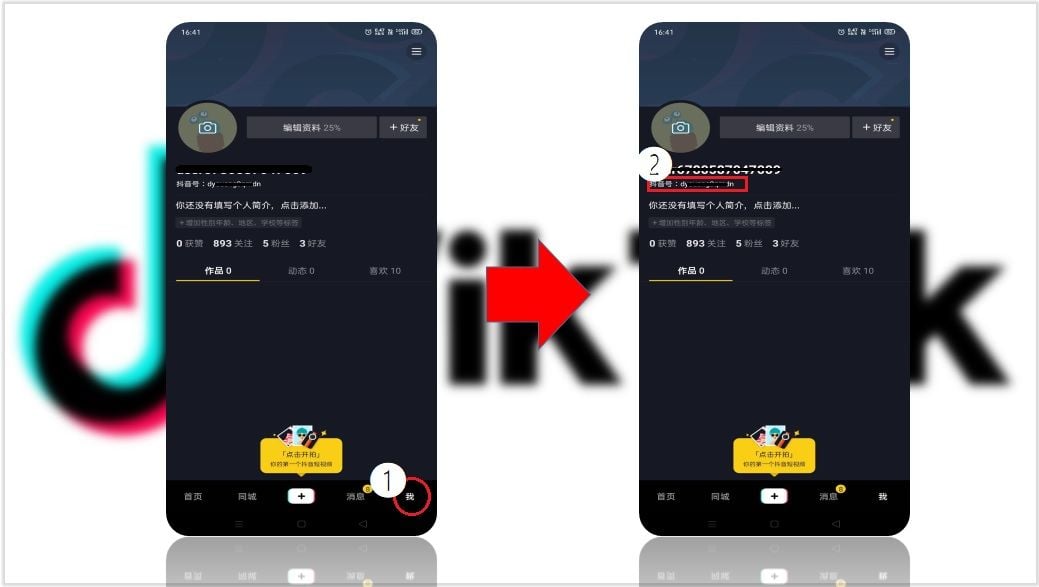
If you have customized your Douyin handle into letters or custom characters, the app still recognizes that string as your official Douyin ID. Paste the exact text string into the recharge field.
How to Recharge Douyin Diamonds on BitTopup Using Douyin ID
BitTopup provides a direct recharge path for international users who do not hold mainland Chinese payment accounts. Follow these steps to complete your order:
- Select Denomination: Choose the quantity of Douyin Diamonds you wish to buy from the catalog options displayed above.
- Enter Account Details: Paste your copied Douyin ID into the required account input field.
- Review ID Accuracy: Confirm that the ID matches your in-app profile character-for-character to avoid misdirected deliveries.
- Proceed to Checkout: Choose your preferred payment option from the supported international checkout methods.
- Receive Your Balance: Once the payment completes, our automated delivery system credits the Diamonds directly to your Douyin account balance.
Safe and Password-Free Douyin ID Recharge Security
Account safety remains the primary priority during every top-up transaction. BitTopup uses a direct UID-based delivery model that protects your personal account:
- Zero Passwords Required: You never need to share your Douyin account password, WeChat login, QQ credentials, or phone numbers.
- No Account Handover: The entire transaction executes externally through your public Douyin ID, eliminating third-party account takeover risks.
- Encrypted Processing: All payment and order details are handled through encrypted channels to safeguard your financial privacy.
- Clean Crediting: Diamonds arrive as legitimate in-app currency balance directly into your Douyin wallet.
How to Check and Verify Your Douyin Diamond Balance After Recharge
Once your order status marks as completed, verify the newly credited Diamonds directly within your Douyin application:
- Open the Douyin app and navigate to your Me (我) profile page.
- Tap the menu icon (three horizontal lines) in the upper-right corner.
- Select My Wallet (我的钱包) from the side drawer.
- Look for the My Diamonds (我的钻石) balance section.
- Your updated total will reflect your existing balance plus the newly recharged Diamonds.
Troubleshooting Common Douyin Diamonds Top-Up Issues
If you run into any issues during or after your recharge, use these troubleshooting steps:
- Balance Display Delay: If your wallet balance does not update instantly, completely close the Douyin app from your device background and reopen it. You can also enter any live stream to check if your in-stream gifting balance reflects the new Diamond count.
- Incorrect Douyin ID Submitted: Because virtual currency deliveries process automatically to the specified account, recharges sent to an active incorrect ID cannot be reversed. Always double-check your ID before completing payment. If you notice a typo immediately before processing completes, contact 24/7 customer support.
- Account Incompatibility: Confirm that your account belongs to the mainland Douyin app and not international TikTok. TikTok accounts cannot receive Douyin Diamonds.
- Network Sync Errors: If your transaction shows complete on BitTopup but your wallet shows no change after a restart, take a screenshot of your Douyin wallet page and contact BitTopup support with your Order ID for immediate investigation.
Frequently Asked Questions
How do I top up Douyin Diamonds using my Douyin ID?
Select your desired Diamond pack on BitTopup, input your exact Douyin ID into the charge account box, and complete the payment using your preferred payment method. The Diamonds credit directly to your in-app wallet balance.
Can I recharge an international TikTok account with Douyin Diamonds?
No. Douyin and TikTok operate on separate server infrastructures and use different virtual currencies. Douyin Diamonds work only on the mainland China Douyin app. Global TikTok accounts require standard TikTok Coins.
Where do I find my Douyin User ID in the app?
Open the Douyin app, tap the Me (我) tab in the bottom-right corner, and locate the line marked 抖音号 (Douyin ID) right under your profile avatar. Tap to copy the identifier directly.
How do I check my Douyin Diamond balance after completing the recharge?
Go to the Me (我) tab in Douyin, tap the three-line menu icon in the top right, select My Wallet (我的钱包), and view your current balance under My Diamonds (我的钻石).
Do Douyin Diamonds expire after purchase?
No. Once Douyin Diamonds are credited to your Douyin wallet, they remain in your balance indefinitely until you choose to spend them on gifts, fan clubs, or creator tips.
Is it safe to recharge Douyin Diamonds without sharing my account password?
Yes. BitTopup only requires your public Douyin ID to deliver your Diamonds. You never need to reveal your account password, SMS verification codes, or personal login information.
What should I do if my Douyin Diamonds do not appear immediately in my wallet?
Force-close and restart the Douyin app, or enter a live broadcast to check your gift balance. If your Diamonds do not reflect within a few minutes, reach out to BitTopup customer support with your order number for prompt assistance.